In a former post I've installed iceweasel 4 from http://mozilla.debian.net/ ( version 4.0-1~bpo60+1 ).
To upgrade to the version of experimental I've added this line to /etc/apt/sources.list :
deb http://ftp.nluug.nl/pub/os/Linux/distr/debian/ experimental main contrib non-free
As root :
apt-get update
apt-get install -t experimental iceweasel
Iceweasel was upgraded to version 4.0-3.
Thursday, March 31, 2011

Friday, March 25, 2011
Firefox Extensions - FabTabs
FabTabs, is kind of an experimental extension for now that will color your Firefox Tabs in a way you have never seen before. By taking a small screenshot of the website you are currently viewing, and calculating the most commonly used color from that screenshot, it tries to take the 1 essential color from the website and applies it to the tab.


Shared Folders In Virtualbox With Linux Guest

Virtualbox is a powerful x86 and AMD64/Intel64 virtualization product for enterprise as well as home use. Read here to get started.
To download go to this page and choose the appropriate package.
After installing the Guest Additions, you can use the Shared Folders Functionality. Make a folder Share in the home directory of your host. When running your Linux guest go to Devices > Shared Folders...( the window running the guest ) click on the icon Add Shared Folder ( Ins ) and navigate to folder Share in your home directory ( host ). Check Make Permanent. Then as root in your guest :
mkdir /media/Share and add this line to your /etc/fstab :
Share /media/Share vboxsf defaults,rw,uid=1000,gid=1000 0 0
Reboot your guest or in your guest mount -a as root.....
Wednesday, March 23, 2011
Run Iceweasel 4 On Squeeze
Go to http://mozilla.debian.net/ and just follow the instructions....
I was only a bit reluctant because libcairo2 had to be upgraded from version 1.8.10-6 ( stable ) to version 1.10.2-1.1~bpo60+1 ( squeeze-backports ). I use a patched version of libcairo2 : http://debian-bits-and-snips.blogspot.com/2011/03/improved-font-rendering-with-lcd-filter.html , but apparently you don't need to patch libcairo2 any more....
Still needed are these lines in ~/.fonts.conf :
<!-- lcdnone, lcddefault, lcdlight, lcdlegacy -->
<match target="font">
<edit mode="assign" name="lcdfilter">
<const>lcddefault</const>
</edit>
</match>
The menu fonts were too tiny so I had to add a userChrome.css with :
/* Global UI font */
* { font-size: 11pt !important;
font-family: Candara !important;
}

I was only a bit reluctant because libcairo2 had to be upgraded from version 1.8.10-6 ( stable ) to version 1.10.2-1.1~bpo60+1 ( squeeze-backports ). I use a patched version of libcairo2 : http://debian-bits-and-snips.blogspot.com/2011/03/improved-font-rendering-with-lcd-filter.html , but apparently you don't need to patch libcairo2 any more....
Still needed are these lines in ~/.fonts.conf :
<!-- lcdnone, lcddefault, lcdlight, lcdlegacy -->
<match target="font">
<edit mode="assign" name="lcdfilter">
<const>lcddefault</const>
</edit>
</match>
The menu fonts were too tiny so I had to add a userChrome.css with :
/* Global UI font */
* { font-size: 11pt !important;
font-family: Candara !important;
}

Sunday, March 20, 2011
Compiling Firefox 4 RC
Mozilla Firefox 4 is almost here! Out of curiosity I compiled the source using Debian Sid in Virtualbox.
See some former posts : http://debian-bits-and-snips.blogspot.com/2011/01/firefox-40b8en-uslinux-x8664tarbz2.html and http://debian-bits-and-snips.blogspot.com/2010/12/error-enable-applicationapp-was-not.html.
.mozconfig ( added to folder mozilla-2.0 after extracting source ) :
.$topsrcdir/browser/config/mozconfig
mk_add_options MOZ_OBJDIR=@TOPSRCDIR@/ff-release
ac_add_options --disable-debug
ac_add_options --disable-tests
ac_add_options --enable-optimize
ac_add_options --enable-official-branding
ac_add_options --enable-system-cairo
ac_add_options --enable-application=browser
mk_add_options MOZ_CO_PROJECT=browser
In mozilla-2.0 open a terminal and enter make -f client.mk. Once the compile is done, the binaries will be in ../mozilla-2.0/ff-release/dist/bin/. After that cd mozilla-2.0/ff-release && make package. Package will be in : mozilla-2.0/ff-release/dist/ (tar.bz2). In my case : firefox-4.0.en-US.linux-x86_64.tar.bz2.
Extracting firefox-4.0.en-US.linux-x86_64.tar.bz2 will yield a folder firefox which I renamed firefox-4.0rc2 and moved into my home directory. To test I opened a terminal inside this folder and I got this error after the command ./firefox -P ( to create a new profile ) : ./firefox-bin : /usr/lib/libstdc++.so.6 : version `GLIBCXX_3.4.14` not found ( required by ./libxul.so ).
Solution : add testing repository to your sources.list, update and in synaptic search for package libstdc++6. In synaptic : Package > Force Version...
 libstdc++6 (4.4.5-8) will be upgraded to 4.5.2-4 and package gcc-4.5-base (4.5.2-4) will be installed. After that remove testing from your sources.list.
Add an entry in your menu and you're done....

See some former posts : http://debian-bits-and-snips.blogspot.com/2011/01/firefox-40b8en-uslinux-x8664tarbz2.html and http://debian-bits-and-snips.blogspot.com/2010/12/error-enable-applicationapp-was-not.html.
.mozconfig ( added to folder mozilla-2.0 after extracting source ) :
.$topsrcdir/browser/config/mozconfig
mk_add_options MOZ_OBJDIR=@TOPSRCDIR@/ff-release
ac_add_options --disable-debug
ac_add_options --disable-tests
ac_add_options --enable-optimize
ac_add_options --enable-official-branding
ac_add_options --enable-system-cairo
ac_add_options --enable-application=browser
mk_add_options MOZ_CO_PROJECT=browser
In mozilla-2.0 open a terminal and enter make -f client.mk. Once the compile is done, the binaries will be in ../mozilla-2.0/ff-release/dist/bin/. After that cd mozilla-2.0/ff-release && make package. Package will be in : mozilla-2.0/ff-release/dist/ (tar.bz2). In my case : firefox-4.0.en-US.linux-x86_64.tar.bz2.
Extracting firefox-4.0.en-US.linux-x86_64.tar.bz2 will yield a folder firefox which I renamed firefox-4.0rc2 and moved into my home directory. To test I opened a terminal inside this folder and I got this error after the command ./firefox -P ( to create a new profile ) : ./firefox-bin : /usr/lib/libstdc++.so.6 : version `GLIBCXX_3.4.14` not found ( required by ./libxul.so ).
Solution : add testing repository to your sources.list, update and in synaptic search for package libstdc++6. In synaptic : Package > Force Version...

Add an entry in your menu and you're done....

Thursday, March 10, 2011
Multi-Column View of Google Search Results

Show Google Results in multiple columns. The default number of columns is set to 2. But it can be easily changed to other number using the Alt+1/2/3 shortcut. ( conflicts with Alt key for changing tabs )
First you need the Greasemonkey addon : https://addons.mozilla.org/en-US/firefox/addon/greasemonkey/.
After that you add the following script : http://userscripts.org/scripts/show/10299.
You will need to choose Instant is off....

Alternative : http://userscripts.org/scripts/show/9310
Phatch: Simple Batch Image Processing Tool
Whether it is resizing, shrinking, applying shadow or watermark or tag, phatch is perfect tool if you have a lot of photos you want to process.
From their site :
Phatch is an user friendly, cross-platform Photo Batch Processor and Exif Renamer with a nice graphical user interface. Phatch handles all popular image formats and can duplicate (sub)folder hierarchies. Phatch can batch resize, rotate, apply shadows, perspective, rounded corners, … and do much more actions in minutes instead of hours or days if you do it manually.
Phatch starts by default with an empty action list, with the logo shown. You start Phatch by adding actions out of a list of predefined functions ( + sign ). The order of the actions is important. If you want to change the order of the actions, you can just drag and drop them as you wish. The last action should always be a Save action. It would make no sense to manipulate images and not to save the result. Your processed images will be found in the location specified in your Save action.
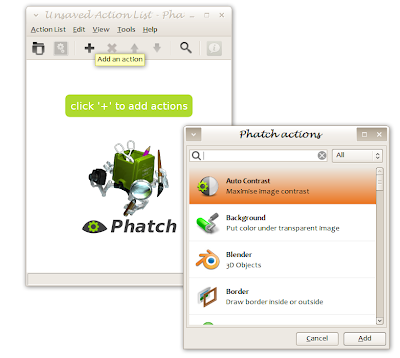
Your favorite actionlist can be saved with Action List > Save As...
From their site :
Phatch is an user friendly, cross-platform Photo Batch Processor and Exif Renamer with a nice graphical user interface. Phatch handles all popular image formats and can duplicate (sub)folder hierarchies. Phatch can batch resize, rotate, apply shadows, perspective, rounded corners, … and do much more actions in minutes instead of hours or days if you do it manually.
Phatch starts by default with an empty action list, with the logo shown. You start Phatch by adding actions out of a list of predefined functions ( + sign ). The order of the actions is important. If you want to change the order of the actions, you can just drag and drop them as you wish. The last action should always be a Save action. It would make no sense to manipulate images and not to save the result. Your processed images will be found in the location specified in your Save action.

Your favorite actionlist can be saved with Action List > Save As...
Subscribe to:
Posts (Atom)